Answer
To renew your annual subscription, you will first need to log in using your email and account password.
If you are unable to log in, you should reset your password.
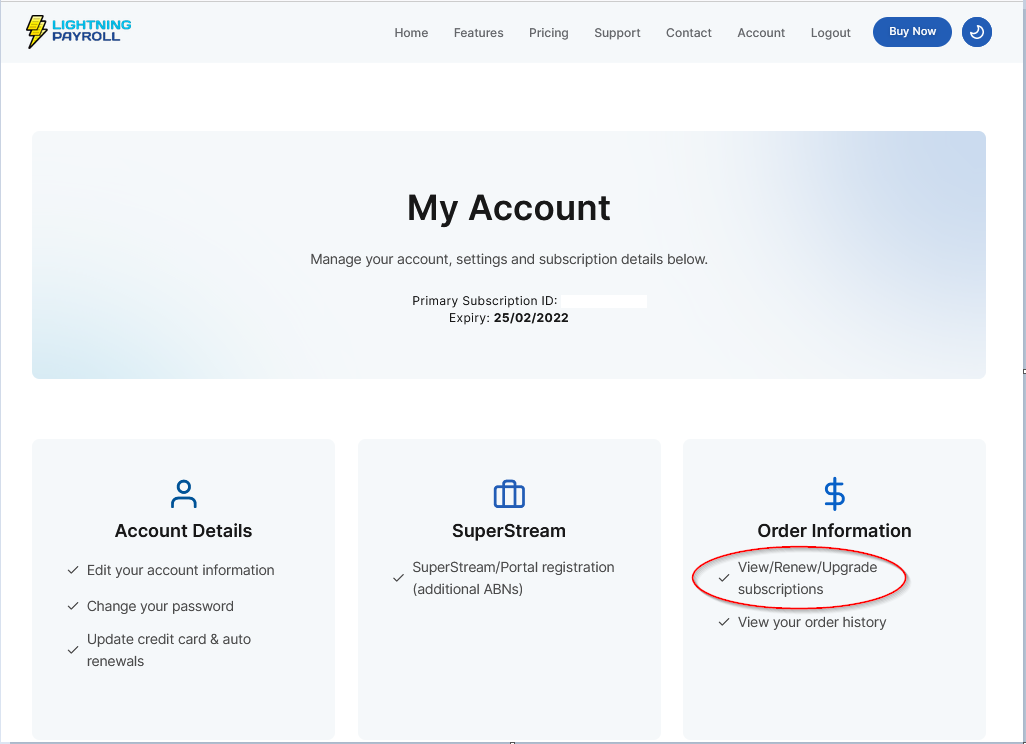
Once you are logged in to the My Account section, click View/Renew/Upgrade Subscriptions, highlight the subscription you want to change, then click Renew or Upgrade.
Renewals
Renewals are charged at the full price and extend your current subscription by either 1 month or 12 months from the existing expiry date. If your subscription has already lapsed, the new period begins from the payment date.
Upgrades
Upgrades always create a brand new subscription starting from today's date.
When upgrading, the system automatically deducts the remaining value of your current subscription from the new purchase price, so you only pay the difference.
For example, if you have an existing Enterprise subscription ($2599 per year) and halfway through (six months) you need to move to an Agent-25 subscription ($3499 per year), you would pay $2199.50. This is calculated as $3499 minus $1299.50, the remaining value of your current subscription.
Add-Ons (Extra Companies and Integrations)
Add-ons such as additional companies and integrations can be selected and purchased during the checkout process when renewing or upgrading your subscription. These options appear as part of your subscription configuration before payment is finalised.
Add-Ons Require an Upgrade
If you only need to increase your add-ons, such as adding more companies, you still need to complete an upgrade. It is not possible to purchase add-ons separately without creating a new subscription.
This means a new subscription begins from today's date, with the remaining value of your current subscription and its add-ons deducted from the total cost.
Example:
- You currently have a large subscription with 2 extra companies (4 total: 2 included + 2 extra).
- You have 3 months remaining on a 12-month subscription.
- You now require 5 companies in total.
In this case, you would:
- Upgrade to a new large subscription.
- Select 3 extra companies (to make 5 total).
This creates a completely new full-length subscription (monthly or annual), and the system deducts the remaining value of your current subscription and its add-ons.
The deduction is calculated proportionally. For example:
- 3 months remaining out of 12 months.
- 3/12 of the total value of your current subscription and add-ons is credited.
This credited amount is then applied to your new purchase at checkout.